
Why do we keep explaining the same things,
even after sending the document?
I used to make most of my proposals and direction documents in PowerPoint. Materials that looked right on my MacBook would look different in another environment, or a video I had prepared would stop in the middle of a meeting. Beyond getting the content right, I constantly had to think about whether the document would open properly on the other person's screen and be read all the way through.
- Fonts and Layout
- When a file I had made on my MacBook was opened on another computer, the fonts would sometimes break or be replaced with different typefaces, changing the line breaks and layout I had carefully set.
- Image Quality
- Images that had looked crisp would sometimes appear blurry or pixelated after being shared or shown on another screen, making it difficult to convey the details I intended.
- Videos and File Size
- As I added more videos and reference materials, the files grew heavier. Waiting for a document to open, or having a video stop halfway through, interrupted the flow of my explanation.
- Ever More Pages
- The more I had to show, the more pages I added. It became difficult to communicate the key points at a glance, and I worried that people were less likely to read the whole document as it grew longer.
I was adding material to explain things more fully, but it was actually becoming harder to see what mattered. I needed a document that let people see the essentials first and explore only what they wanted to know more about, rather than one they had to page through from beginning to end.
Sharing and revising the materials was cumbersome, too. Export the file, reduce its size, attach it to an email. When something changed, send a new file and check again. "Which version are you looking at right now?" I had worked hard on the content, yet there was so much else to coordinate.
That was when I began thinking from the recipient's point of view. What if they could see, all in one place, what to read first, which evidence to check, and what decisions they needed to make?
Could someone understand without me there,
and choose what to do next?
How I created a proposal
and a set of working guidelines.
Recently, I took on direction for one brand and had an opportunity to propose branding work in a meeting with another company. I used HTML documents in both situations. Each opened like a web page, bringing explanations, images, and links to reference materials together in a single document.
The two documents served slightly different purposes. I designed the direction document to help its recipient understand the context and carry out the work, and the proposal to examine the company's current position and possible improvements alongside the evidence, then discuss the scope of collaboration. Below, I have excerpted only the parts I can share publicly.
To understand the brand's direction
and actually put it into practice
In directing a brand, my main concern was whether the recipient could fully understand the context I had in mind and translate it into their own work. Simply collecting attractive reference photos and sending them over was not enough to communicate the direction I intended.
Looking at the same photo, one person might take inspiration from the colors, another from the pose, and someone else from the background. So I wrote down why I was referencing each image, which elements needed to stay, and where there was room for change. I did not want to stop at, "Please make it feel like this."

Below is the section providing direction for creating homepage images. I made it possible to view the reference image at a large size, check what to take from it and what could be changed immediately below, then continue on to the production specifications and prompt. I documented it this way so the recipient could begin production with an understanding of why this direction made sense, without needing me beside them to explain it again.
- Understand the Context
- Why this scene is a reference, and what direction it is meant to convey
- Check the Criteria
- Which elements must stay, and which can be freely changed
- Carry Out the Work
- Which specifications and production guidelines to use when starting the work
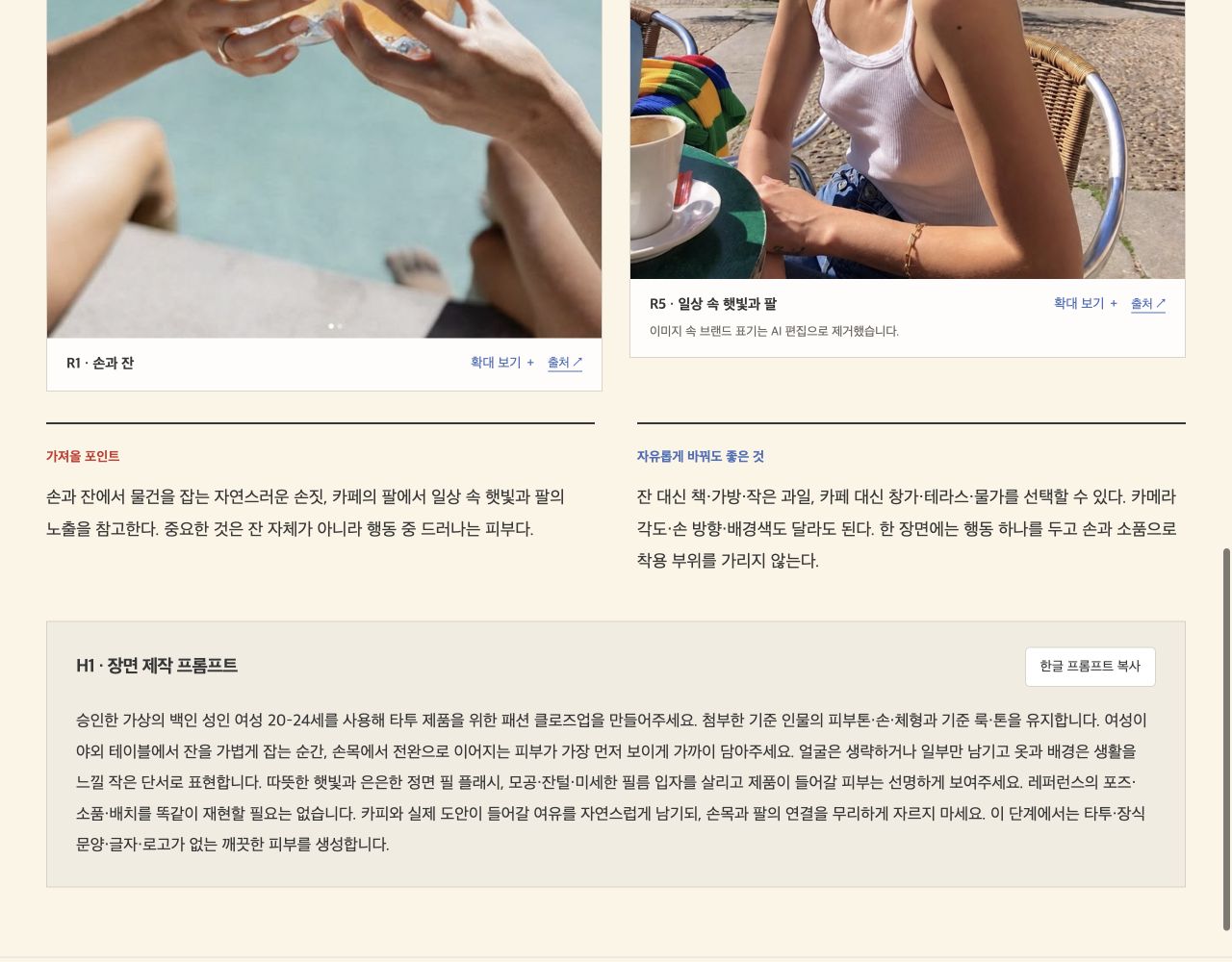
I have excerpted the image production guidelines from the full brand direction document. Notice how the explanation moves from reference photos to production criteria. Screens that reveal the brand and internal materials have been excluded.
To assess a company's current position
and propose improvements backed by evidence
The second document was created for a meeting in which I proposed branding work to a company. Before listing what I could do, I first organized what I had researched about the company, the current state of its branding, and where improvements were needed.
I then connected this to the direction I was proposing and the work I would take on within it. Wherever seeing an example would help the other person understand the proposal, I added links to the actual research materials, web pages, and YouTube videos.

I also matched the reading order to the conversation in the meeting: from "This is where things stand now," to "These are the areas I suggest improving," "This example will make it easier to understand," and "Of this work, here is what I can take on." To avoid interrupting the explanation while searching elsewhere for materials, I made it possible to open the evidence we needed right there, then return to the proposal.
- Company Research
- Review the research on the company alongside the current state of its branding.
- Proposed Improvements
- Explain what could be improved and why, along with the reasoning and direction behind the proposal.
- Review Examples
- Open links to research materials, web pages, and videos at the moment they are needed in the explanation.
- Discuss the Scope
- Distinguish between work I will handle directly, work we will do together, and work that needs a separate party.
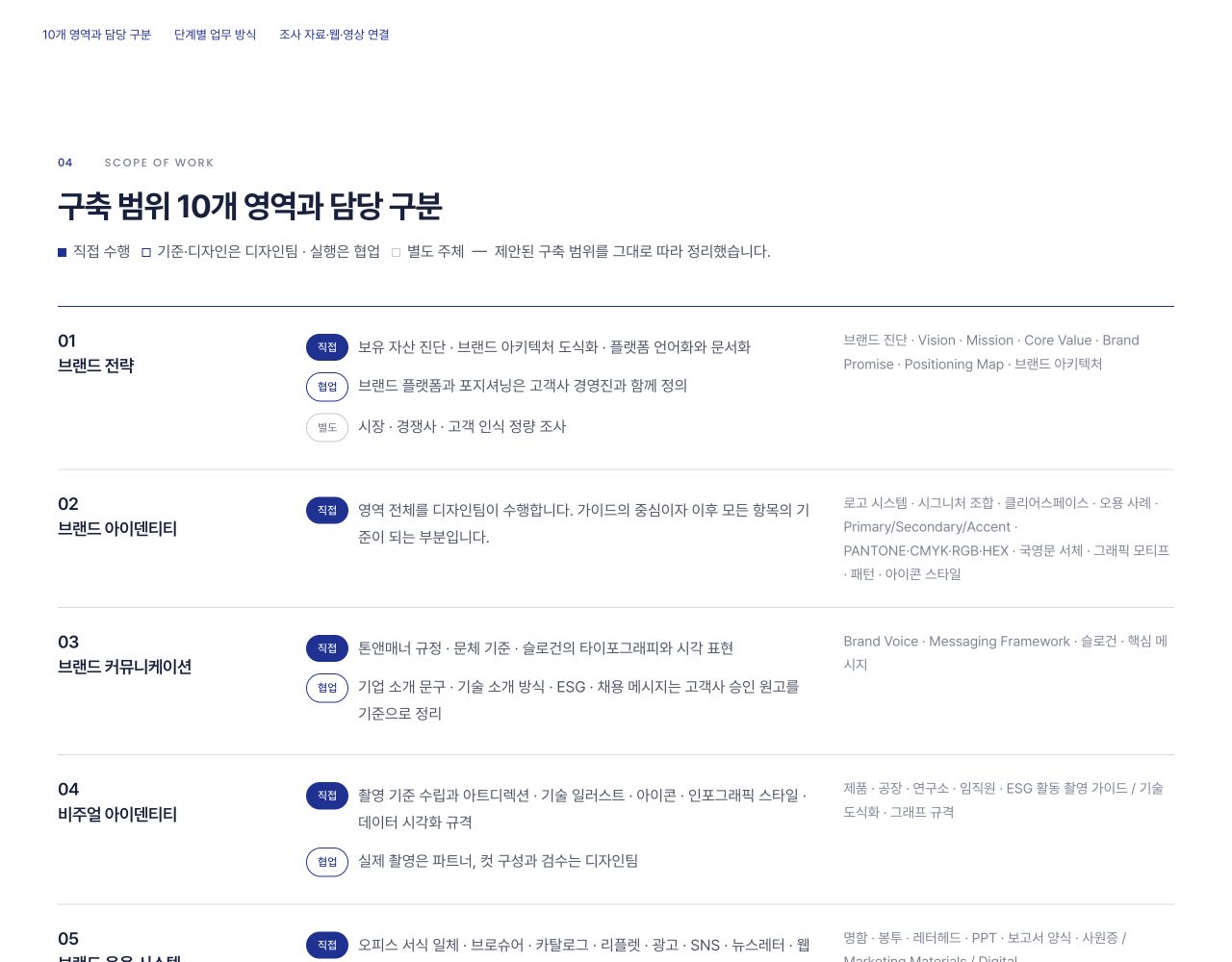
The original also contains company research, a review of the current branding, and proposed improvements. Here, I have excluded content that reveals client information and am sharing the sections that connect the scope of work and working process with public reference links.
I also made the research accessible
right beside the explanation.
The point was not to collect all the reference links at the end of the document. I connected each source at the point in the proposal where someone might ask, "How is this actually being done?" I placed them so readers could check the original sources, web pages, and videos immediately as they moved through the document.
Go beyond explaining,
and connect readers to material they can check.
These are public materials I referenced in the actual proposal. Use the buttons to explore the document's explanations alongside the original sources.
-
01
Research Material · Official Press Release
"An anniversary event involves more than a logo."
I linked material from an actual event next to the key point of the proposal. The original source shows the sequence of the event and how it brought commemoration together with a vision for the future.
View the original research source Official press release · Opens in a new tab -
02
Web Page · Brand Management Example
"The central message and design standards need to be visible together."
Instead of simply adding an image, I linked to the official brand page. Readers can see for themselves how the slogan and corporate identity are explained, and where the necessary files are provided.
View the actual web page Official brand page · Opens in a new tab -
03
YouTube · Corporate Brand Film
"A company's direction can also be expressed through video."
I linked a brand film right next to the explanation of the content theme. By watching it, readers can decide which scenes and messages to reference, and what would be appropriate for us.
Watch the video on YouTube Video linked in the original document · Opens in a new tab
Read the explanation Check the original source, web page, or video Return to this document and make a judgment
The wording has been adapted from the original's key points to illustrate how the links work. Client information has been excluded; the external sources display the names of the brands and institutions referenced. Videos open on YouTube and do not autoplay on this page.
What mattered to me was not adding lots of links. It was explaining why I was showing each source and what the reader should look for. Connected this way, the proposal allows readers to go beyond hearing an explanation: they can examine the evidence and bring their own judgment to it.
My measure of a document shifted
from page count to purpose.
Presentation slides are good for focusing attention on one slide at a time. PDFs are useful when you need to share or print something in a fixed layout. I found HTML well suited to designing a flow in which readers could open reference materials as they read, jump to the sections they needed, and keep reading even on a small screen.
In the first document, what mattered was moving from understanding the context to carrying out the work. In the second, it was reviewing the current situation and evidence before deciding on a collaboration. Even with the same HTML format, the order of the explanation and the materials I linked changed with the purpose.
For me, the important change was less about the file extension than beginning to think about what the person using the document would do next. Could they immediately check the evidence they were curious about during a meeting? Could the person receiving the production brief understand the intention and get to work? Could someone reopen the document later and find the reason behind the proposal?
A well-made document
SIHA'S NOTE
does more than explain.
It helps people make their next decision.
When you manage a document through a link, you can revise and share it at the same address. But the latest state is not always the right one. I update documents under review and keep approved content separately, with a date and version number. Distinguishing between content that will keep changing and a finalized record became part of how I designed the document.
A different format
opens up these choices.
The table below compares presentation and distribution materials shared as files with HTML documents designed to be managed through a link. No format automatically solves every problem.
Video loading speed depends on file size and the network connection; font display depends on how fonts are included. With HTML, too, you need to check the actual environment in which the document will be used.
Is it easy for the recipient to read,
and easy to find again?
This change is not simply a matter of personal preference. Looking at the experience of reading documents on screen makes it clear why format and structure need to be considered together.
On small screens, text that reflows matters.
Research on online document usability highlights problems such as losing your place on fixed pages or having to zoom in to read small text on mobile. Web accessibility standards also recommend making body text readable on narrow screens without requiring continuous scrolling in both directions.
Research on the experience of reading PDFs online ↗Reflow criteria for adapting to screen width ↗Keep it in a form that search engines and AI can read.
If the knowledge is suitable for public sharing, there are benefits to keeping it in a web document with a clear title, body, and sources. It makes the relevant parts easier for people to find and can help search systems understand the structure of the content.
However, HTML does not guarantee search visibility or AI citations. PDFs and PowerPoint files can also be searchable. Whether the content is public, whether it is accessible, how trustworthy it is, and what search systems choose all play a part. Official search-engine guidance likewise emphasizes basic search requirements and useful body content rather than special AI-only files.
Official guidance on AI search ↗Searchable file types ↗That is why I first distinguish between documents by their purpose. I publish writing I want to reach a wide audience, and set access permissions for proposals I am reviewing with specific people. Documents intended to be found through search and documents used for discussion need different approaches to sharing.
Start with your next document,
and work through these steps.
You do not need to build a large system from the outset. Choose one document for an upcoming meeting, and begin by organizing the sequence in which the other person will read and make decisions.
- 01
Decide what the reader needs to decide.
Before creating a table of contents, write the document's purpose in one sentence. The information you need will depend on whether the reader needs to choose a direction, agree on the scope of work, or begin actual production.
Example: "After reading this document, choose the image direction for the first screen." - 02
Plan the order of the explanation, not the page count.
Background → Problem → Proposal → Evidence → Execution → Points to Check. Write out this flow first, and have each section answer one question. Put lengthy supplementary explanations in expandable sections.
Check: Does the logic of the proposal hold together when you read only the table of contents? - 03
Write the criteria for judgment beside each reference.
For an image, note what to take from it. For a table, state the conclusion to draw. For a link, explain why to open it. Connecting references where they are needed in the text is easier to understand than creating a list of attachments.
Example: "Use the lighting and negative space in this image as references. The background and props can be changed." - 04
Explain both the content and the behavior to AI.
Provide your organized draft and request mobile reflow, table-of-contents navigation, image enlargement, reference links, and print handling. Decide at the same time whether to send a file or publish it on the web, so the way images and fonts are stored can match that choice.
Check: Do the features you need actually work? - 05
Review it on the recipient's screen.
Check that the text is not too small on a phone, tables do not push the page sideways, and links open the right materials. If there is video, test playback. If you plan to send a file, move it to another folder and check that the images still appear.
If the document will be used offline, also test it separately with the network disconnected. - 06
Set the sharing method and rules for revisions.
For a document shared on the web, check the URL and permissions, and record the revision date and changes whenever you update it. Keep a separate copy of the approved version. If the recipient needs a file, provide the HTML or a reviewed PDF as well.
Suggested message: "This is the current review version. I will record any changes at the top of the document."
A prompt to help you get started
Please turn the draft below into a vertically scrolling HTML document.

Reader: [The person receiving the material]
Decision to make after reading: [One decision]
Delivery method: [Web address / HTML file]

1. Organize it in this order: background, problem, proposal, evidence, execution, and points to check.
2. Add a table of contents at the top that lets readers jump straight to the section they need.
3. Beside each image, indicate what to reference and what can be changed.
4. Keep long explanations collapsed, but make the key conclusions immediately visible.
5. Make sure the body text does not overflow horizontally, including on mobile.
6. If it will be delivered as a file, include the necessary images and fonts,
   and clearly distinguish content that requires an internet connection.
7. Set up the print layout so the body text is not cut off.
8. Do not invent numbers, examples, sources, or results that have not been provided.

[Insert the draft and reference materials here.]
The more often a document is reused,
the more this is worth trying.
People Who Frequently Make Proposals
When you want to review the evidence and scope together during a conversation, and leave the same explanation available after the meeting.
People Who Teach or Run Workshops
When you want to share materials that let people revisit examples, links, and the sequence of exercises after a session.
People Who Work with Others
When you need to align responsibilities and completion criteria, and help people receiving the document for the first time understand the context.
People Who Turn Experience into Knowledge
When you want to reuse material from one occasion as an article, a guide, or a set of criteria for the next project.
Other formats are more convenient in these situations.
Slides are convenient when you need to show one page at a time at the presenter's pace; PDFs are convenient when a print or submission format is fixed. If several people need to edit simultaneously, a collaborative editing tool may be a better fit. Preparing both HTML and PDF versions is another option.
Questions before you get started
Can I make one without knowing HTML?
AI can help you create your first document. But you still need to decide on the content and structure, and check the links, how it looks on screen, and how its features work. Starting with a simple table of contents and body text makes it easier to review.
Will using HTML solve all my video and font problems?
You still need to configure and test things. Video playback varies with the format, file size, and network connection, and externally loaded fonts may not appear if the connection is lost. It is a good idea to prepare fallback fonts and separate links to the videos as well.
Can I open it without an internet connection?
If you embed the images, fonts, and scripts the document needs, or keep them alongside it, that content can be viewed offline. External videos and web links need an internet connection. Including more assets also increases the file size.
Is my material securely protected if I only share the URL?
Making something viewable only to people who know its URL is not the same as setting access permissions. Share private materials in an environment with login requirements or document-level permissions, and check whether they contain internal materials or sensitive information.
Will publishing in HTML automatically make my document appear in search and AI results?
Being public, being indexed, and being cited are different things. Even if systems can access your content and it is useful, search visibility and citations are not guaranteed. Accurate body text, clear titles and sources, and an easy-to-read structure matter more than HTML itself.
What if the recipient asks for a PDF?
You can also create a print-ready PDF from the HTML. However, you need to check page breaks, image sizes, and whether tables are cut off separately. Videos and expandable sections do not carry over in the same way, so supplement them with links or explanations.
What if approved content changes during revisions?
Keep the review URL separate from the final version. Save the HTML or PDF as it stood at approval, with a date and version number. Add the revision date and a change log to the working document so everyone is discussing the same version.
Changing the format
changed the way I explain things.
When I was focused on filling slides, my first concern was where to place images and sentences. Now I begin by thinking about what the other person needs to know, where they will pause, and what decisions they need to make.
It has also become easier to reuse an explanation in another document. Part of a proposal becomes an execution guide; criteria developed during the work become the starting point for the next project. I have begun to feel that the time spent creating a document carries forward into the next piece of work.
When you create your next document, I suggest asking this question before choosing a file format.
Will the person receiving this document
know what to do next
without hearing the explanation again?
I am changing the format of my documents to answer that question. Rather than materials whose job ends when I send them, I want to create documents that keep the conversation going and can be used again in the work that follows.
Further Reading
- Usability problems when reading PDFs online
Document usability research · 2020.08.09
- Accessibility criteria for reflowing content on small screens
Explanation of international web accessibility standards
- Official guidance on AI search features and web content
The difference between search eligibility and guaranteed visibility
- File types that search engines can index
Support for PDFs, presentations, and other formats beyond HTML
Checked on 2026.09.14. The linked examples are anonymized public excerpts from documents I actually created. Brand names, identifiable screenshots, and internal materials and links have been excluded. The AI-generated illustrative images in this article are distinct from the reference photos in the actual documents.