
I know I saved it.
Why can't I find it when I need it?
I save good articles. I take screenshots of images I want to reference later and write down things said in meetings. At the time, I am sure I will use them again. But when that moment comes, I have to start by finding where I put them.
Was it in a messenger, Notion, or Drive? I try different search terms and eventually look for something similar again, or reconstruct it from memory. Even when I have already done the work, getting started again takes time.
That was my experience for a long time. As a brand director, I help businesses and shops decide how they present themselves to customers. Working across planning, design, and content means ideas, references, and client requests keep accumulating. Yet for all that activity, surprisingly few of my records helped with the next job.
If you are a freelancer or solo business owner who proposes the work, makes it, and talks to clients yourself, this may sound familiar. Ultimately, I am the only person who remembers what I did, finds the material, and connects it to the next task.
So I decided to build a system. Not to become more diligent about taking notes, but because I wanted something I had already done to make the next round a little easier.
Organization wasn't the real problem.
I had no way to reuse what I saved.
I had material in note apps, Notion, and Drive. But when I wondered whether a previous client had made a similar request, I could not retrieve it readily. I began to look less at where I saved things and more at what I recorded alongside them.
The location was not the only problem. Even when I found the file, it did not tell me why I had saved it, which task it was for, or what I had decided at the time.
For example, imagine saving a client's comment: "The explanation is too long." That sentence alone will not tell you what needed changing. To use it in another proposal, you also need to know which proposal it concerned, what the client did not understand, and what you decided to change.
The same note becomes more useful with context
and why we decided to change itSomething to reference in the next proposal
What I had saved was the material.
What I needed again
was the reason behind the decision.
The same was true of nearly twenty years of experience: why an idea occurred to me, a choice that did not work, or something I wanted to do differently next time. Relying on memory made that experience hard to retrieve when a similar situation arose. I did not need a bigger archive. I needed a structure that connected past experience to the work in front of me.
I started using AI.
Then another kind of busywork appeared.
At first, AI felt exciting. I thought that simply handing over the reading and organization of scattered material would make things much easier. It did help me get drafts and summarize long texts.
But receiving an answer did not finish the work. I still had to choose the material to share, explain what I did, correct what did not fit, and save the result. At the next task, I brought out the same background explanation again.
I often wondered, "Am I using AI properly?" Answers arrived quickly, but my days were still busy. Was there less work, or was I doing the same work in a different way?
I used AI to reduce the work.
Then organizing its output
became another task.
So I changed direction. Rather than explaining everything from the beginning with every request, I wanted the next task to draw on my work and decisions already made. That meant recording which client it was for, what we had agreed to do, why we chose that direction, and what remained undecided.
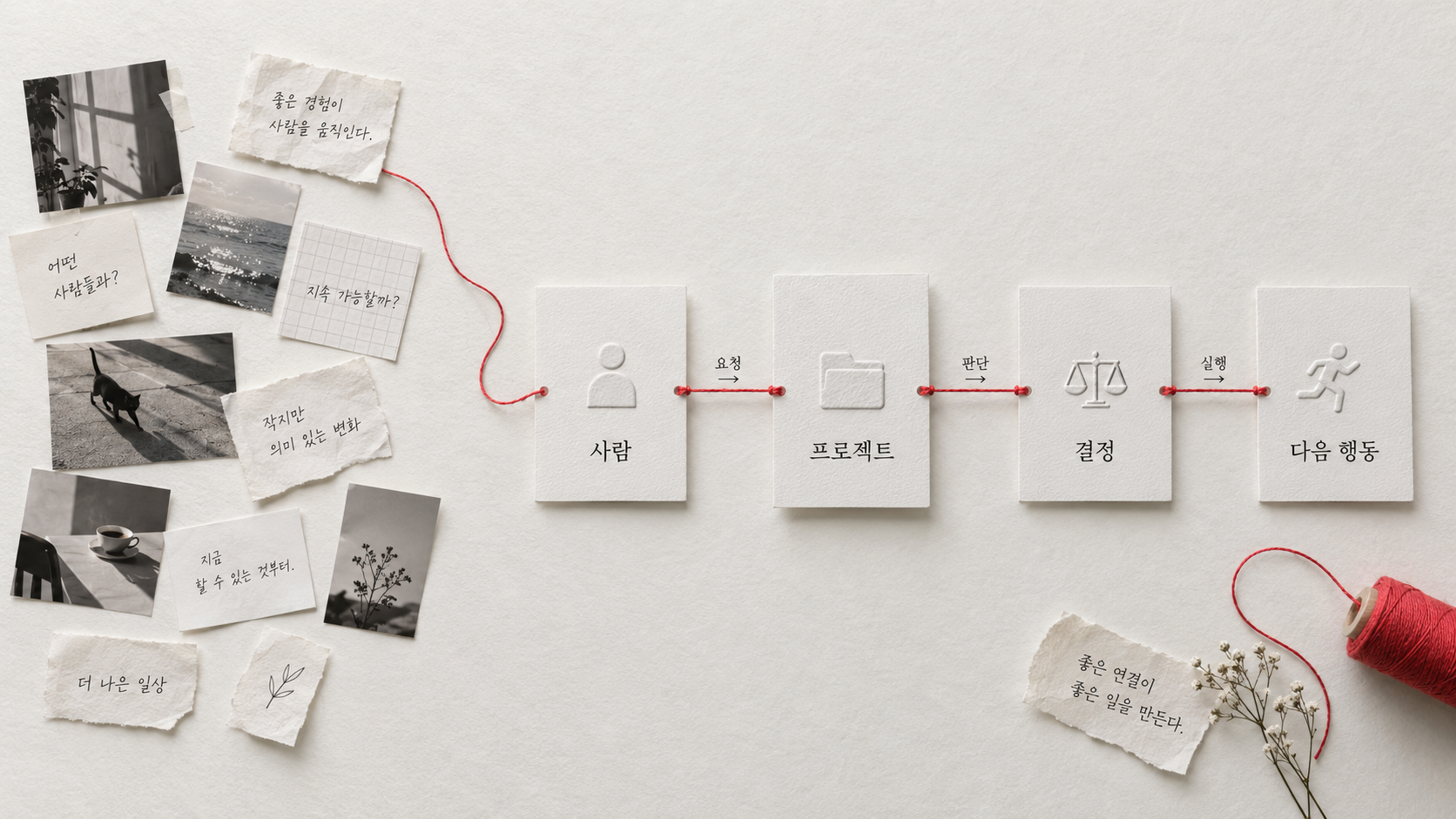
That is how I became interested in a personal ontology system. The term may sound difficult, but the idea I want to apply to my work is simple: rather than storing people, projects, material, and decisions separately, define how they relate to one another. I want to preserve the sequence: this client's request changed the direction of this project, so this is what we need to do next.
I thought that connecting these organized records so AI could reference them might reduce how often I had to explain all the background myself. Collecting records does not mean AI automatically knows everything. I still have to decide which material it can read and check important judgments. I want to reduce not the act of deciding, but the repeated gathering and explaining that comes before a decision.
What is an ontology system
in the context of AI?
Put simply, it is a structure that defines meanings and relationships so AI can distinguish what information is about and how it connects to other information when consulting your material.
- The definition in AI
- An ontology is a knowledge representation framework that explicitly defines the concepts, properties, relationships, and meanings within a domain. For example, it defines what a "client" or "project" is and what relationships such as "is responsible for" and "requested" mean, so people and programs can handle information consistently. Tom Gruber · Definition of Ontology
- How can it be used with AI?
- After storing and connecting records according to these definitions, you add an integration that lets AI retrieve relevant material. Rather than consulting only documents with similar words, it can reference which client's project a request came from and which decision it led to as evidence for an answer.
- What I mean by a personal ontology system
- I am applying this principle to my own work records. I want to build a system that records relationships between people, projects, material, and decisions, retrieves relevant records, and passes them to AI for summaries or subsequent tasks. This is not the name of a particular app; it describes how I organize my records and connect them to AI.
Client feedbackService introduction projectA decision to shorten the first page
If these relationships are connected to the original meeting notes, you can set up AI to retrieve the feedback and decision records when asked, "Why did we change this introduction?" The shift is from finding the material again to also finding the reason behind the judgment.
An ontology is not itself an AI model or an automation tool. You need an integration that lets AI read the organized records. That alone does not make AI remember everything permanently or carry out work on its own. Check the relationships and answers AI proposes against the original material.
Concept reference: W3C's overview of its ontology representation standard. The personal-work applications and examples here are this article's explanation.
How AI defines me
will be a competitive advantage.
Building this system led me to another realization. Knowledge management organizes things internally, but now I also need to organize what others can see.
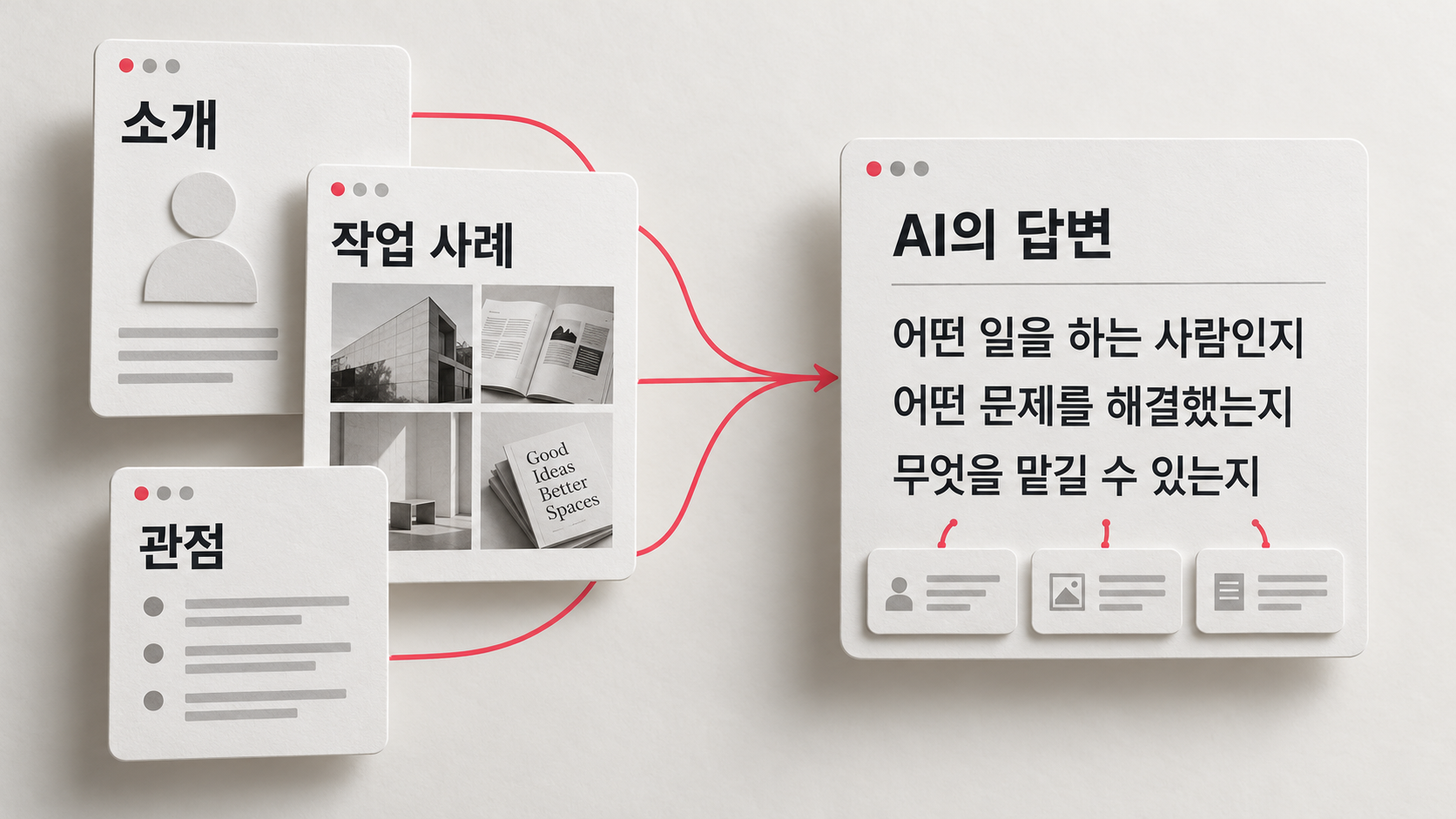
People now ask AI instead of entering keywords into a search box: "Recommend a brand director" or "Who is good at AI branding?" How AI describes me in response to those questions shapes my brand. Beyond ranking highly on Google, being included in AI's answers will be a competitive advantage.
That is why I started exploring GEO (Generative Engine Optimization) and AEO (Answer Engine Optimization): structuring my information so AI can describe me accurately. It is also why I built a website, connected my activities, and organized them in a format AI can read. If I do not define myself first, AI may define me inaccurately.
What do GEO and AEO mean?
Both refer to approaches that help search and AI services use your content in their answers. They are not entirely separate technologies; in practice, the terms overlap. Their different emphases can be explained as follows.
- GEOGenerative Engine OptimizationOptimizing for generative answers
When generative AI synthesizes multiple sources into an answer, this approach organizes information and evidence so your content can be referenced or cited.
Applied to a websiteRather than only describing the work you do, publish real cases that show your role, decisions, and outcomes. You are leaving evidence AI can consult when describing your expertise.
- AEOAnswer Engine OptimizationOptimizing for answers to specific questions
This approach writes and structures a clear answer to a particular question so search and AI services can use it.
Applied to a websiteFor a question such as "What does a brand diagnostic service do?", explain who it is for, how it works, and what the client receives briefly and specifically.
A personal ontology helps me reuse my own records. GEO and AEO help public information become useful in search and AI answers. This does not mean making all private work records public.
These are not separate tricks that require abandoning SEO (Search Engine Optimization). Google says existing SEO fundamentals also apply to AI search. Well-organized information does not guarantee citations, recommendations, or visibility in search results.
Definitions and application guidance: GEO research paper · Adobe's explanation of AEO and GEO · Google Search Central
This is not only for famous people or large companies. Solo professionals also need to explain what they do, which problems they have solved, and why someone should work with them. Actual work and the judgments behind it can say more about me than a job title alone.
To reuse past work
I record what was requested, why I made a particular decision, and what needs to happen next.
To understand what they can ask me to do
I show which problem I took on, how I approached it, and what my role was.
That is why I want to turn experience accumulated internally into cases others can understand. This is not about revealing all of a client's private material. Within what I am allowed to share, I want to explain which problem I solved and how. A record that helps me reuse my work can also become evidence of why someone might choose to work with me.
Official guidance I consulted about AI search
The statements above express my perspective on how AI describes information and makes recommendations. They do not mean that traditional search has disappeared or that organizing information guarantees an AI recommendation. Google says established SEO fundamentals also apply to AI Overviews and AI Mode, with no separate AI-specific file or special optimization required. Meeting the requirements does not guarantee indexing or visibility. Official Google Search Central documentation
I am not building a system
so I can do more work.
Honestly, I am the kind of person who builds systems because I would rather not have to work.
I work because I want freedom. That is why I keep building systems: things that can operate without me, keep accumulating once set up, and be retrieved later. The purpose of automation and structure is not more work, but the same result with less effort.
And there is another reason. As this system develops, it can become a product. Not just something for me, but something I can sell to people facing similar problems. Freelancers and solo business owners know this feeling of fragmentation. Building a way to solve it, using it myself, and organizing it into something I can offer is what I am doing now.
Of course, collecting records alone does not create a product someone needs. What matters is whether others share the difficulty I experienced and can apply my approach to their work. Rather than handing over my working files unchanged, I want the templates and design method to explain what to record and how to connect it, so finding and explaining things again takes less effort.
What makes my experience useful to someone else?
- 01Record the problemThe difficulty I faced
and how I addressed it - 02Explain the methodCriteria and steps
someone can follow again - 03Check the needDo others need it,
and can they actually use it? - 04Plan the productChoose a format:
a template, guide, or course
Solve a problem I experienced,
then help someone else
use that method in their own work.
That is where I want the experience shared in this article to lead. Rather than keeping what I learned working alone as personal know-how, I want to turn it into a product that reduces someone else's trial and error. That is what monetizing experience means to me.
How to start today
You do not need an elaborate system. When you jot down one thought today, add just this question.
"Which project or topic
does this connect to?"
That one connection is a starting point for an ontology. You begin accumulating relationships, not just information.
For example, if you find an introduction page you like, save more than its link. Add a line: "Reference for the first page of next month's proposal. I like how it explains the service in one sentence before anything else."
Later, you can recall why you saved it and where you could use it, not just where the page was. As small connections accumulate, you can give AI material with reasons to reference it rather than a bare list of links.
After starting with one line, you may wonder which fields to record or how to connect records across multiple projects. So you do not have to invent every rule alone, I am preparing both a structure you can start using and a way to learn the design process.
If you want to structure your knowledge this way
You might prefer to start with a template, or learn how to design a structure around your work. I have separated these into two options so you can choose what you need.
Personal Ontology Starter Kit
A Notion template and design guide for connecting scattered information through relationships
For people who keep records consistently but need criteria for connecting them to projects and using them again.
Planned as a free resource for newsletter subscribers · Kit in preparation
Brand OS Course Early Bird
Build a structure AI can understand: a five-part online course
For people who want to organize their records for AI to reference and develop past work into an introduction, content, or a first product plan.
Free launch notification signup is in preparation · Enrollment and payment will be separate after the launch announcement
The kit and course are in preparation. Subscriptions, launch notification signups, and payments are not being accepted here. Access details will be announced when they are ready.